
Security / Privacy
Sero is a local-first developer tool. It runs on your machine, stores profile state locally, and can optionally connect to remote services such as model providers, GitHub, plugin registries, Discord, Tailscale, or the Sero gateway.
This page is practical guidance, not a claim of hardened isolation. Treat Sero like a powerful local automation environment: protect the profile directory, review what plugins and remote clients can reach, and report security issues privately.
Security reports
Do not put sensitive details in a public GitHub issue or pull request. If the repository enables GitHub private vulnerability reporting or security advisories, use that feature. Otherwise, contact the maintainers through a verified private channel.
Include impact, reproduction steps, commit/build context, and whether the issue requires local access, profile access, network access, or a malicious plugin or workspace.
Local/profile state is sensitive
Sero's active profile contains auth stores, settings, workspace metadata, plugin state, memory files, and logs. The canonical path map is State and Folders; use that page when checking what to redact from bug reports, screenshots, terminal output, and shared logs.
Common sensitive paths include:
Before sharing diagnostics:
- never paste raw API keys, OAuth tokens, gateway tokens, Discord bot tokens, or full auth files
- redact private local paths, project names, prompts, Tailscale serve URLs, Remote Control login URLs/QR codes, and workflow details when they are not needed for the report
- rotate any secret that may already have been exposed
- prefer private reporting when security impact is plausible
Profile-scoped storage helps keep Sero state organized, but it is not a cryptographic boundary. Someone who can read your active profile files may be able to recover useful secrets or steer connected integrations. For setup, custom profile locations, switching, deletion, and credential-copy behavior, see Profiles and Onboarding.
Local vs remote/networked surfaces
Local by default
These surfaces are local/profile-scoped unless you explicitly copy, sync, or expose them elsewhere:
- profiles and the profile registry
- provider auth/settings and local/custom model config under
<SERO_HOME>/agent/ - workspaces under
<SERO_HOME>/workspaces/ - global app state under
<SERO_HOME>/apps/ - installed plugins under
<SERO_HOME>/agent/plugins/ - memory files, layout state, and debug output
Remote or networked when enabled
These surfaces can talk to external systems, while their Sero-side state remains stored locally:
- model/provider API calls and OAuth flows
- GitHub authentication and repository access
- plugin installs from npm, git, or local source paths
- gateway remote-control clients
- Discord and Tailscale integrations
- plugin-specific third-party integrations
Remote integrations can expand what an attacker can do with a stolen token, profile file, or malicious plugin. Enable them intentionally and remove or rotate credentials you no longer need.
Stored-secret and renderer safeguards
Sero exposes Electron safe storage to plugins that need to store a secret. When operating-system encryption is available, Electron encrypts the value before Sero stores it. If encryption is not available, Sero uses base64 encoding and shows a security warning. Base64 does not protect a secret. Do not assume that all profile credentials use safe storage.
GitHub authentication uses safe storage when it is available. Other auth files and plugin state can have different storage rules. Check the integration before you copy or share its state.
Renderer and browser controls
Sero applies Electron/browser safeguards intended to reduce accidental exposure and common renderer risks. These are defense-in-depth controls, not a guarantee that arbitrary content or untrusted plugins are safe.
Current safeguards include:
- main-window navigation is restricted to trusted app origins; development also allows the local Vite origin
- popups for
httpandhttpsURLs are opened externally through the operating system shell, while other popup attempts are denied - webviews are configured conservatively: no Node integration, context isolation enabled, sandbox enabled, insecure content disabled, and preload scripts stripped from untrusted webviews
- permission requests are deny-by-default except for limited cases such as media and sanitized clipboard writes
- the renderer Content Security Policy is intentionally narrow, with allowances
for Sero extension assets, required media domains,
blob/datawhere needed, and loopback HTTP/WebSocket sources used by local auth and viewer flows
These controls should not be described as a hardened browser sandbox for all possible plugin or web content. Treat plugin code and embedded remote content as part of the security surface.
Permission prompts and user feedback tools
Sero has a focused permission gate for some dangerous bash tool calls. It does
not gate every tool, every filesystem action, every plugin action, or every
agent decision.
The current gate checks bash commands for a limited set of risky patterns,
including examples such as:
- recursive destructive delete patterns like broad
rm -rf sudochmod/chownpatterns such as777- disk-writing or formatting commands such as
mkfsanddd ... of= - redirection to raw disk devices
- shutdown/reboot/halt/poweroff commands
Simple workspace-scoped cleanup can be auto-allowed when it parses as a plain
recursive remove inside the current workspace and does not target the workspace
root or .git paths. Complex shell constructs, globs, and shell-control
characters are treated conservatively.
In Sero mode, the gate asks through the user-feedback bridge and times out by default. In CLI/non-interactive contexts where confirmation is unavailable, dangerous matched commands are blocked by default.
Sero also includes user-feedback tools such as question, questionnaire, and interview flows. Those tools are for collecting user input; they are not the permission gate and should not be treated as a general security approval system.
Admin and MCP management surfaces
Some powerful configuration and inspection features are intentionally UI-first. That keeps the agent-facing tool surface smaller, but it is not a hard security boundary by itself.
- The Admin plugin is a UI-only surface for inspecting configuration, sessions, and logs. Do not assume it is an agent tool just because it appears in the app.
- The MCP plugin keeps the agent-facing surface small: the agent uses the bridged
mcptool, whilemcp_manageris a UI/runtime management surface.
These distinctions reduce accidental exposure and clarify intent. They do not replace careful handling of profile files, plugins, MCP servers, or gateway access.
MCP servers can also send content that Sero shows to you or gives to the agent. Sero runs an MCP app in a sandboxed frame and asks you before the app gets the camera, the microphone, or the clipboard. Sero treats a remote MCP skill as untrusted content from its server: the skill gets no tools, and Sero asks you before code runs for it. See MCP.
Gateway and remote-control access
The gateway is off by default. It only starts when explicitly enabled with
SERO_GATEWAY=1.
When enabled, a master-token gateway client has the same effective power as the desktop UI. It can open sessions on any workspace, send prompts, steer or abort agent turns, and list workspaces and sessions. Scoped web tokens may limit supported gateway workspace/session/file/artifact access to explicit workspace IDs, but that is not a comprehensive per-tool or agent-action permission system. Because prompts can lead the agent to run tools, treat gateway credentials like high-privilege secrets.
Writes a remote client can make
Most gateway requests only read. These change something:
- Send a prompt, steer, or abort a turn. Any authorized token. A prompt can lead the agent to run tools, which is why a gateway token is a high-privilege secret.
- Create a session. Any token authorized for that workspace.
- Answer a pending question. A question that names a workspace can be answered by any token that reaches it. A question that names no workspace can be answered only by the master token.
- Mark notifications read. Any authenticated token. This changes no file.
- Upload a file (
upload_file). Any token authorized for that workspace. A bare name lands inuploads/; the path may not escape the workspace, and an upload never overwrites — a taken name gets a numeric suffix. The cap is 20 MB. Workspace scope is the right bar here because a token that can prompt a workspace can already have the agent write a file in it; refusing the direct path would buy nothing. - Write a widget's state (
app_state_set). Any token authorized for that workspace. The client names the file by an opaque key, never by path, and the key resolves only to a file aremote: truewidget owns in a workspace that token reaches. The write is the same atomic, etag-checked write the desktop makes. - Register this browser for notifications (
push_subscribe). Any authenticated token. See Web Push below. - Commit changed files (
git_commit). Master token only. A scoped web token is refused even for a workspace it can otherwise read.
The commit is the only request that changes a git repository. Its limits:
- it commits exactly the paths the client sends, and nothing else. The commit is built in a temporary index, so a file staged on the desktop but not selected stays staged and out of the commit. A selected file that has a staged copy commits that copy, which is the diff the phone showed; a file with no staged copy commits its working-tree content
- it refuses while a merge, rebase, cherry-pick or revert is part-way through
- it never pushes, amends, discards or stashes; there is no gateway request for any of those
- the commit runs as the desktop user, with that user's git identity and
signing configuration. The repository's pre-commit, prepare-commit-msg,
commit-msg and post-commit hooks run as they would for
git commit, and a hook that fails refuses the commit with its own message. Running the hooks this way needs git 2.36 or later - a hook that stages a file the client did not select refuses the commit; nothing is committed and nothing is left to undo
- if a commit lands on the desktop while the phone's commit is being made, the phone's commit is refused rather than placed on top of a base it did not see
Important gateway limits:
- the master token is profile-scoped and should be stored/handled like a root password
- scoped web tokens may limit supported gateway workspace/session/file/artifact APIs to explicit workspace IDs, but master-token clients remain profile-wide
- there are no comprehensive gateway-specific tool restrictions beyond the
normal Sero/Pi tool behavior and focused
bashpermission gate described above - failed master-token authentication is limited per source IP: the fifth attempt within one minute starts a five-minute block, and successful authentication resets the counter; there is no general authenticated-request or model-spend rate limit
- the gateway accepts at most 50 concurrent WebSocket connections in total and 10 per source IP
- unauthenticated connections time out after 10 seconds; authenticated idle connections time out after 30 minutes
- a WebSocket message is limited to 36 MiB before request-specific validation
- Tailscale exposure depends on tailnet trust and should use
tailscale serve, not public funneling - Discord stays disabled when
SERO_DISCORD_USERSis empty; configure an explicit user allowlist before starting the adapter - token URLs, QR codes, Tailscale serve URLs, Discord bot tokens, and gateway token files are redaction-sensitive because they can grant access or reveal private routing details
Prefer login prompts or ephemeral shell variables over putting tokens in URLs or command history. Stop Tailscale serve, disable the gateway, and rotate tokens when remote access is no longer needed.
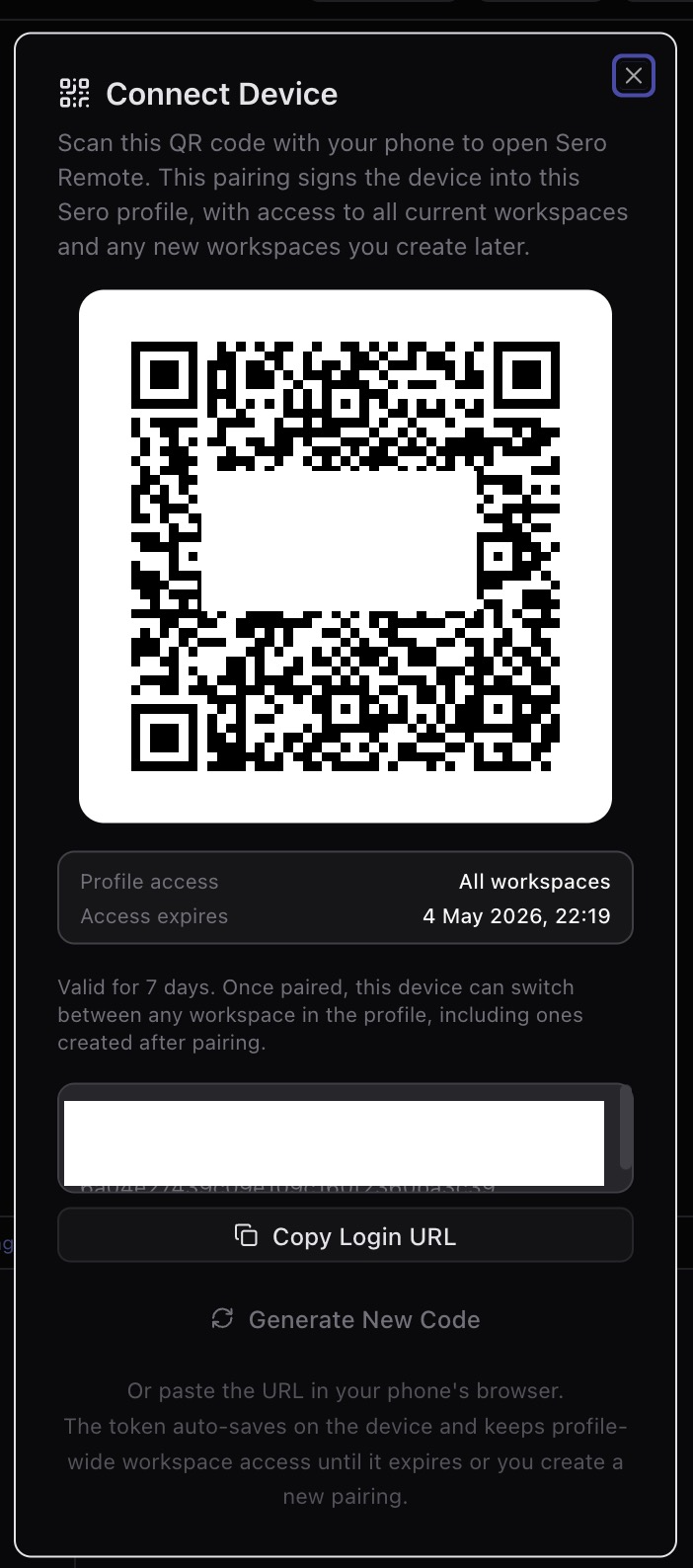
The pairing dialog is security-relevant because it shows both the access scope and expiry for a remote web device. Treat real QR codes and login URLs from this screen as secrets; redact them from screenshots and rotate exposed tokens.
Web Push
Sero Remote can notify a phone with the app closed. This is the one part of remote access that leaves your tailnet, so it is worth reading.
What leaves the machine, and where it goes:
- A push travels through the browser vendor's push service — Google, Mozilla or Apple — because that is the only way to wake a closed app. Your tailnet cannot do it.
- The payload carries the source, the kind of event, the workspace id and a path to open. It never carries message content, session content, or a token. The phone fetches the details over the tailnet when you tap.
- The payload is encrypted to that browser's own key, so the push service moves it without reading it.
What controls it:
- Push is off until someone turns it on, per device, from the notification feed. The browser asks its own permission on top.
- A subscription is filed under the token that made it, with that token's workspace scope frozen in. A scoped token's phone is only pushed events from the workspaces it may see.
- An event that names no workspace is pushed to owner tokens only.
- Revoking or expiring a web token drops its subscriptions at once, and every send checks the token again first, so a token that expired since the last prune gets nothing.
- A token with a client connected right now is not pushed to. It already has the event over the socket.
- A push service answers
410 Gonefor a browser that dropped its subscription. Sero forgets it then.
The subscription endpoint is a capability: whoever holds it can send that
browser a message. It is stored with the same file permissions as the
gateway token, in gateway-push-subscriptions.json.
Security boundaries
Sero does not claim:
- universal permission prompts for every tool or action
- comprehensive blocking of all dangerous agent behavior
- hardened multi-tenant isolation
- cryptographic isolation between profiles
- that containers are a complete security boundary against malicious code
- that Admin or MCP UI-only management is a hard access-control boundary
- that gateway access is a comprehensive per-workspace, per-tool, or per-agent-action permission system
- that third-party plugins are reviewed or sandboxed to a production security standard
Use Sero on machines and workspaces where you are comfortable running a powerful local developer assistant, and review remote access, plugin installs, and stored credentials accordingly.