
Graphify
Graphify builds a local knowledge graph for selected workspaces. It maps code symbols and their connections, then merges workspace graphs so that you and the agent can search across projects.
What Graphify indexes
Sero indexes code only. Graphify uses Tree-sitter to find classes, functions, imports, calls, and other code relationships. This work runs on your machine.
Sero does not send code to a model. You do not need to select a model or configure an API key. Initial builds, cached refreshes, rebuilds, profile merges, and searches are free.
Graphify can also process documents, PDFs, images, and media with a model. Sero does not enable that semantic pass. It will require a separate opt-in design before it is available.
Communities and labels
Graphify uses the local Leiden clustering algorithm to group connected code into communities. A community often matches a subsystem, such as authentication or workspace management.
Graphify names each community after its most connected code symbol. These deterministic labels do not use a model. A label can be less polished than a model-generated description, but it keeps the report readable without another paid step.
Index your first workspace
When you create a workspace, Enable Graphify indexing is off. Turn it on only for workspaces that you want in the profile graph.
For an existing workspace:
- Open Graphify.
- Turn on the switch for the workspace.
- Wait until the workspace status is indexed.
- Enter a question in Search across all indexed workspaces... and select the search button.
Index all enables every workspace. Graphify does not index the global workspace that contains profile memory.
Graphify installs its Python tools in Sero's shared machine tool area. It does not install them in the active profile.
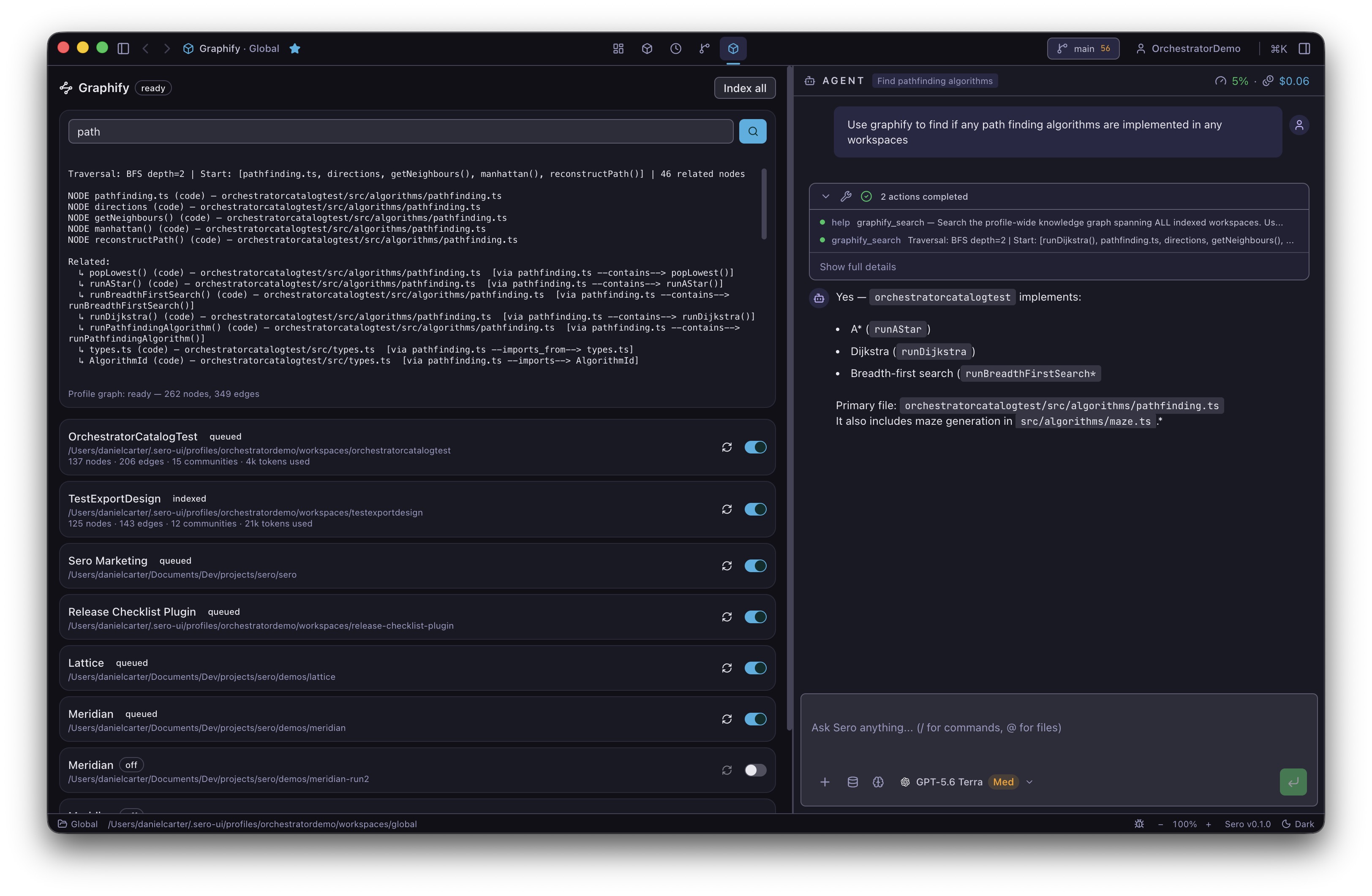
Check and update the graph
Each workspace card shows its state, node and edge counts, and Graphify version. Use the Rebuild icon when a graph is not correct or after you update Graphify. A rebuild starts from an empty temporary graph and uses --force --code-only. Graphify replaces the current workspace graph only after extraction and clustering finish. If the rebuild fails, Sero keeps the current workspace graph and merged profile graph.
Graphify queues a local AST update after an agent edits files in an enabled workspace. It also runs an update when Sero starts, so it can include changes made while Sero was closed.
If no indexed file changed, Graphify keeps the current graph and skips clustering and the profile merge.
One-time code-only migration
Graphs created before Sero changed Graphify to code-only indexing can contain old document, PDF, image, or media nodes. Sero detects these graphs from their missing indexing-mode version. It stops automatic refresh for the affected workspace and shows clean rebuild needed.
Select Rebuild once. This local rebuild removes the old graph and creates a code-only graph. It makes no model calls and needs no API key. After it succeeds, Sero records the current indexing-mode version and automatic refresh starts again.
A restart does not repeat an incomplete build. A workspace with no graph shows not built and waits for you. A failed build shows error with a Try again button.
Turning off a workspace stops its updates but keeps its graph files. Turning it on again uses the existing graph. If you remove the workspace from the profile, Graphify removes its graph files and rebuilds the merged profile graph.
Use Pause to stop queued indexing work.
Update the Graphify tool
The panel shows the installed Graphify version. When a newer version is available, the panel offers an update.
An update is always your decision. A new extractor version can invalidate cached work. Graphify does not rebuild any workspace after an update until you ask.
Ask the agent about code
The agent can use these tools:
For example, ask, What calls the authentication module? Check the returned file paths and relationships against the source. A graph can be out of date while an update is queued or after a failed build.
Graphify can also add graph context to an agent session. Session orientation and search-result augmentation are on by default. Automatic query augmentation is off by default.
Storage and recovery
Graphify stores profile data under <SERO_HOME>/apps/graphify/:
state.jsoncontains settings, each workspace indexing-mode version, and queued requests.graphs/<workspace-id>/graphify-out/contains each workspace graph.graph-rebuilds/temporarily holds clean rebuilds and recovery copies. On the next rebuild, Graphify removes old temporary builds and restores an old recovery copy if its active graph is missing.profile/graph.jsoncontains the merged graph.
Graph artifacts do not enter your repositories.
If indexing fails, read the error on the workspace card. Select Try again after you correct the cause. If provisioning fails, the Graphify header shows failed and the panel shows the provisioning error.