
Models and Providers
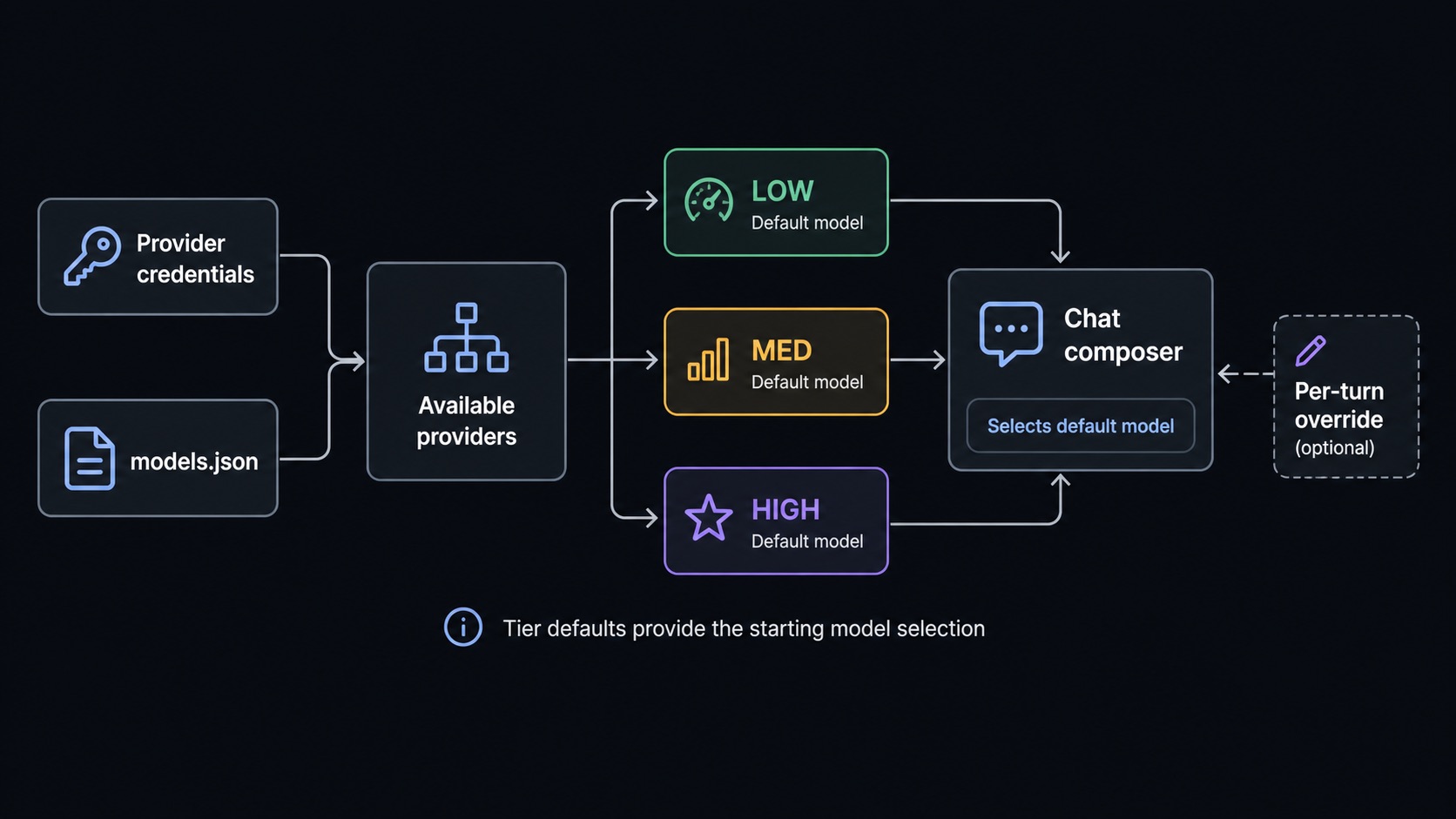
Sero uses providers for model access and model tiers for everyday choices. A profile can use hosted API-key providers, OAuth-backed providers from the Pi SDK, plugin-defined providers, and local/custom providers from models.json.
Sero does not bundle third-party credentials. You connect your own accounts, API keys, environment-backed credentials, or local endpoints.
Sero reads authentication methods from the active Pi provider metadata. Saved credentials stay in the desktop main process. Environment credentials are shown as environment-backed and are not overwritten when you change a saved key.
Quick path
- Create or open a profile.
- Connect at least one provider during onboarding or in Admin.
- Confirm provider health shows usable models.
- Pick LOW, MED, and HIGH defaults.
- Use the chat model selector only when you need a session-specific override. For the broader composer/context workflow, see Agent Sessions and Context.
Provider types
Provider inventory
The active Pi SDK catalog also contains other API-key and OAuth providers. The provider list in Sero is the current inventory because the catalog can change when the Pi SDK changes.
Environment-backed keys are detected through Pi's provider auth handling. They are not copied into the UI as plain Sero-owned credentials. A failed remote model refresh does not undo a successful login or key change.
Plugin-defined providers
Packages can add provider metadata through sero.providers in their manifest. Sero scans compatible built-in packages, installed profile plugins under <SERO_HOME>/agent/plugins/, extensions under <SERO_HOME>/agent/extensions/, and configured local package paths.
Plugin-defined providers follow the same health/reconnect behavior as other API-key providers when their manifest declares auth.type: "apiKey".
Provider registrations are shared across active Sero sessions. A plugin must
use unregisterProvider() only when it intends to disable that provider for
the whole desktop host.
Provider health statuses
A provider can have credentials but no usable models. Sero keeps enough information to warn you rather than silently hiding broken saved choices.
LOW, MED, and HIGH tiers
Tiers are profile-level defaults:
Each tier stores both a model and a thinking level. Thinking is tier-based: LOW, MED, and HIGH can each use different thinking levels, and Sero only offers levels supported by the selected model.
Use Admin to change profile defaults. The model selector changes the model for the current session. Its gear icon opens Model Manager, where you can manage favourites, hidden models, and local providers.
Thinking levels
Sero derives available thinking levels from the selected model's provider, model ID, display name, reasoning flag, and whether the model appears to support extra-high reasoning. If a model does not support the selected thinking level, Sero warns instead of pretending the setting is valid.
Good defaults:
- LOW: fast model with thinking off or low.
- MED: everyday model with moderate thinking if supported.
- HIGH: strongest model with higher thinking when useful.
Local and custom providers
Local/custom providers are stored in:
Open Model Manager, then select Local. The quick setup options include LM Studio, Ollama, vLLM, and a custom OpenAI-compatible server.
For a task guide, see Local LLMs with LM Studio. For exact supported fields, see models.json Reference.